

 Free WooCommerce plugin · no licence key
Checkout without the login wall.
Shoppers check out with just their email. Passwordless Checkout links the order to the right customer account, creates one if needed, and lets them log in later with a one-time link. No passwords, no duplicate accounts.
- Free on WordPress.org
- Classic + Block checkout
- HPOS ready · tested up to WP 7.1

WebEquipe Passwordless Checkout is a free WooCommerce plugin that removes forced login and passwords from checkout. It matches each order to a customer account by billing email, creates the account silently when there isn't one, keeps one account per email, and lets customers log in later with a single-use magic link. It works with the classic and Block checkout and supports HPOS.
Works with
 WooCommerce
- ▤Classic checkout
- ▦Block checkout
- ⚡HPOS
- ✓Any WooCommerce theme
Doesn't need
- Licence key
- External services
- Tracking
- Shortcodes
Why Passwordless Checkout
The login wall costs you orders
Default WooCommerce
- Returning shoppers are asked to log in, and forget their password
- Guest orders aren't linked to the customer's account
- The same person ends up with several accounts
- "Lost your password?" emails and support tickets
With Passwordless Checkout
- Checkout asks for an email, nothing else
- Every order is linked to the right account automatically
- One customer, one account, full order history
- Login by one-time link, so there's no password to forget
See it in action
From guest checkout to logged-in customer
Watch a guest order land in the right account, then log in from the email link, without ever setting a password.
How it works
One email address, one customer
Activate it and the defaults are already on. Here's what happens on every order.
- 01
Guest enters an email
Checkout stays open to everyone. No login prompt, no password field.
- 02
Email is matched
The billing email is checked against your customers. If there's no match, an account is created silently.
- 03
Order is linked
The order joins that customer's history, so there's one account per email and no duplicates.
- 04
Log in with a link
Next time, the customer types their email on My Account and gets a single-use login link.
The difference
Most plugins fix login. This fixes the account behind it.
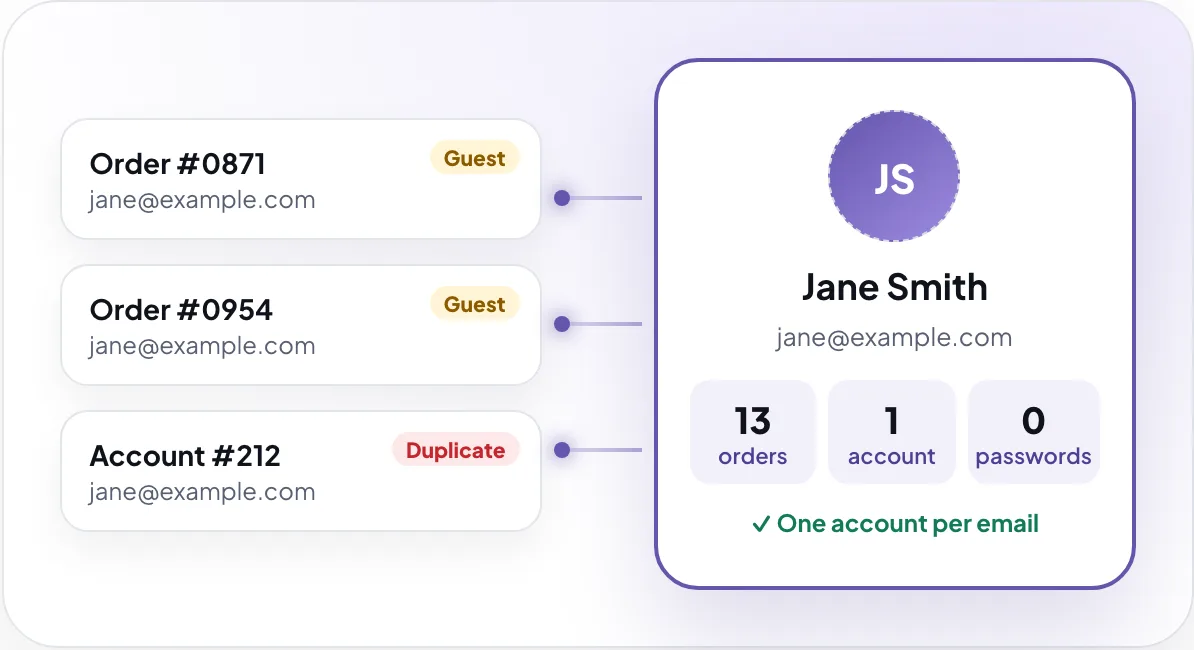
Magic-link login alone doesn't help if Jane already has three guest orders and two accounts. Passwordless Checkout links every order to one account by billing email, and gives you a tool to merge the duplicates you already have.
- Past and future orders in one placeCustomers see their full history on My Account, wherever they ordered from.
- Clean up existing duplicatesPreview two accounts side by side, then move orders and missing addresses into one.
No passwords
Magic link login for WooCommerce customers
On My Account, customers enter their email and get a link that logs them in. It works once and expires on its own.

- Login modesPasswordless only · Passwordless + password · Password only
- Expired link?One click sends a new one.
Features
Every step after "Place order"
From the first guest order to the customer's next visit, and the tools you need behind the scenes.
Checkout and orders
Checkout stays open to guests. Each order is matched to a customer by billing email, or a new account is created silently, so nobody is asked for a password.
- Guest orders linked by billing email
- Accounts created silently, no credentials email
- Classic and Block checkout
- Pay invoices and custom orders without logging in

Account access
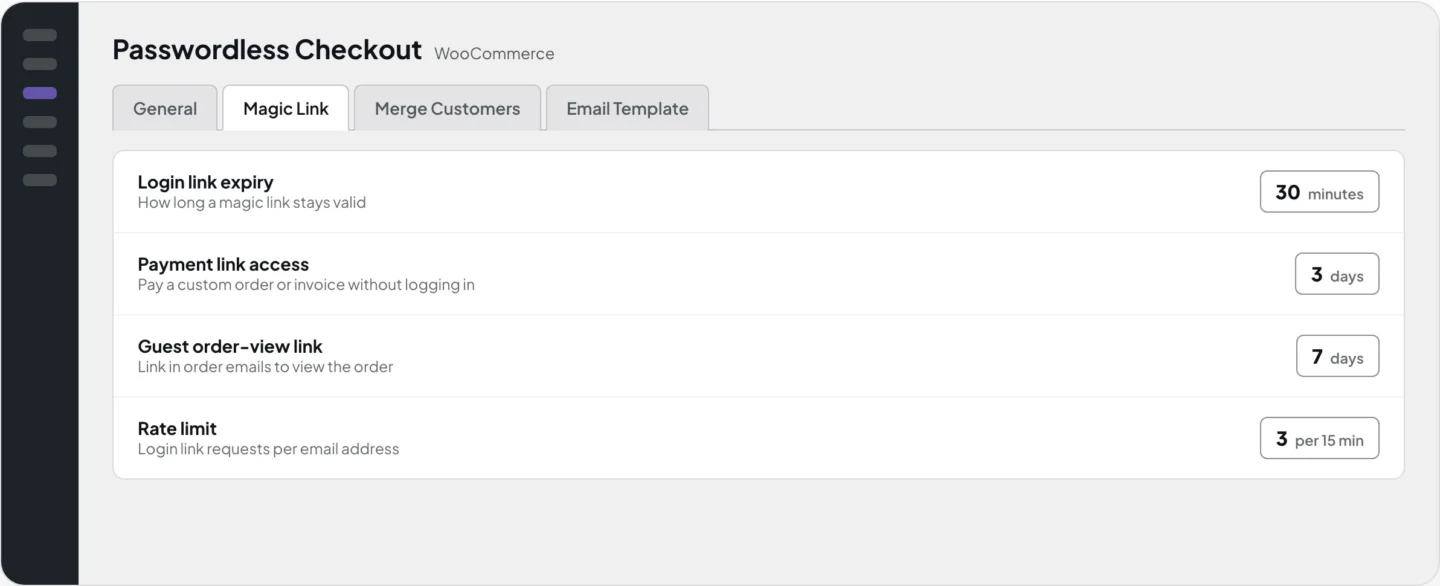
Customers log in from My Account with a link sent to their email. Links work once, expire on their own and are rate limited. Guests can also view an order from the link in their order email.
- Single-use login links, 30 minutes by default
- Three login modes
- 3 requests per 15 minutes per email
- Guest order-view links, 7 days by default

Admin tools
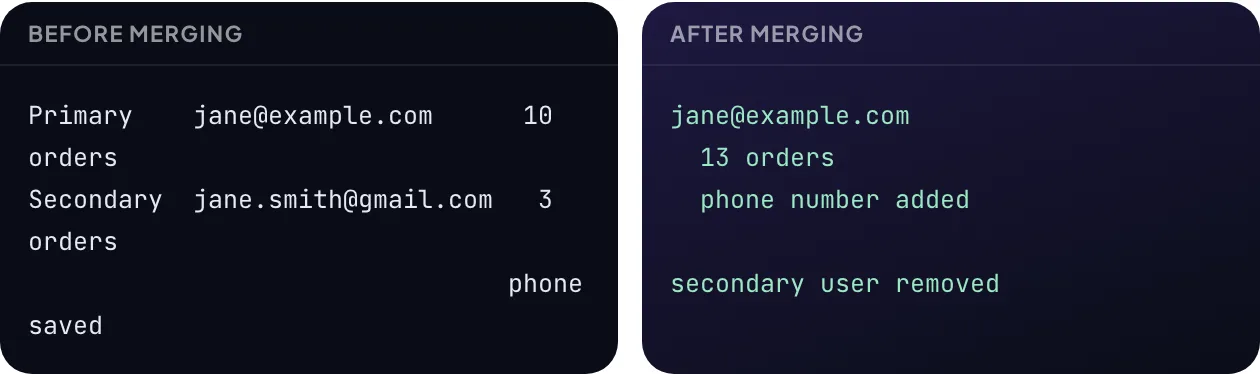
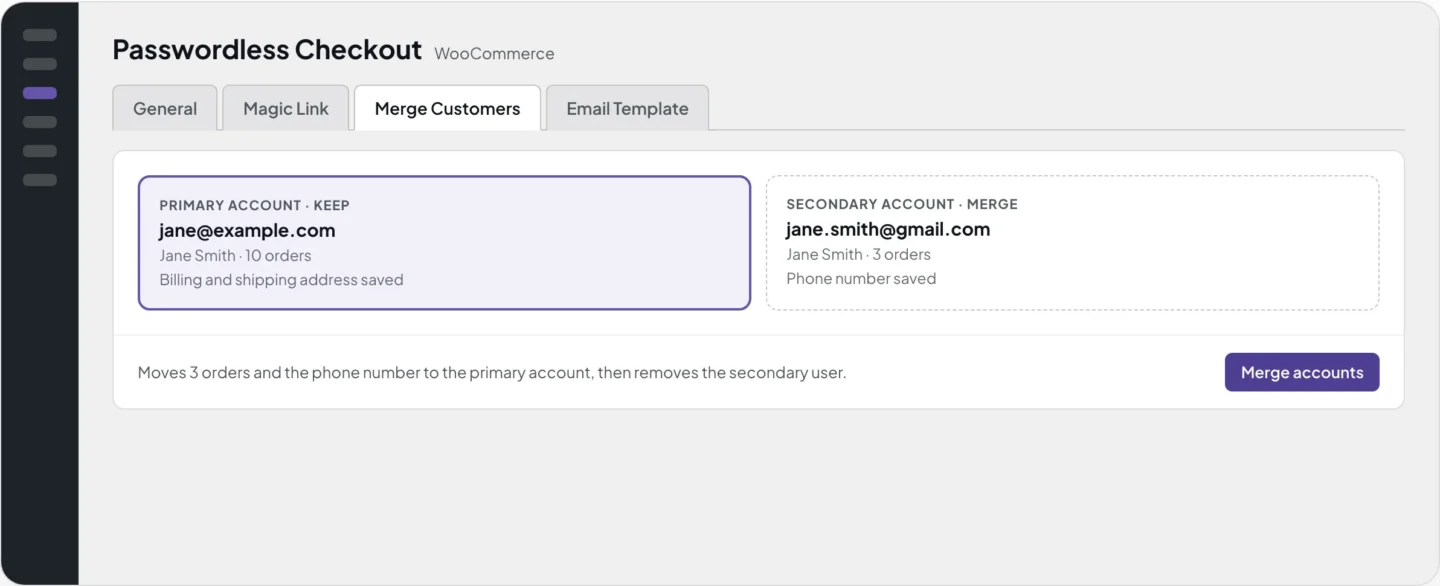
Find two accounts by email, preview them side by side and merge. Orders move to the primary account, missing address details are filled in and the secondary user is removed.
- Find, preview and merge duplicates
- Orders and missing addresses moved
- Optional logging in WooCommerce logs
- Settings in four tabs
Inside WooCommerce
Four tabs, sensible defaults
Everything lives under WooCommerce → Passwordless Checkout. Most stores never change a thing.


Security and privacy
Safer than a password nobody remembers
- Nothing leaves your storeNo external requests and no tracking. Customer data stays in your WordPress database.
- Hashed, expiring tokensLogin tokens are random, stored hashed, and cleaned up daily.
- Single use, rate limitedEach link works once. Requests are limited per email address.
- Admin-only toolsSettings and merging need the manage_woocommerce capability and a nonce.
09:41:02  requested   jane@example.com  (1 of 3 in 15 min)
09:41:02  token       random, stored as a hash
09:41:03  emailed     expires 10:11
09:41:05  opened      by inbox scanner · not used
09:42:40  confirmed   by Jane · logged in
09:42:40 deleted can't be used againBuilt by WebEquipe
From the team behind PDF Search Pro
The same developers build and support Passwordless Checkout. PDF Search Pro is rated 5.0 ★ on WordPress.org, and reviewers mention fixes within 24 hours.
- 1.0.2Scanner-safe login linksLinks are used only when the customer confirms. Invoice links no longer log visitors in, and notices show for guests too.
- 1.0.1New name in the plugin directoryDisplay name, slug and text domain now match the WordPress.org listing.
- 1.0.0First releaseAuto-linking, silent registration, magic-link login, guest order view, invoice links, merge tool, Block checkout and HPOS.
Reviews
What WordPress users say
“These app people have the most stellar response and support: contacted them twice for small hiccups and, within 24 hours, app adjusted!”
What's next
Coming in Pro
Planned, not released yet. The free plugin stays free.
- PlannedSocial login with Google and Apple
- PlannedOne-time codes as an alternative to links
- PlannedBulk merge for duplicate accounts
- PlannedBranded HTML login emails
FAQ
Questions about passwordless checkout
What does WebEquipe Passwordless Checkout do?
It is a free WooCommerce plugin that lets shoppers check out without logging in. Each order is linked to a customer account by billing email, an account is created silently if there is none, and customers log in later with a single-use link sent to their email. Nobody sets or receives a password.
Does it require WooCommerce?
Yes. WooCommerce must be installed and active, otherwise the plugin will not activate.
Will it change my existing customers or orders?
No. Activating it does not modify existing orders, customers or settings. It applies to new orders from then on.
Are passwords ever sent?
No. The plugin never generates, shows or emails passwords or password setup links.
Does it work with the Block checkout?
Yes. Both the classic shortcode checkout and the Block-based checkout (Store API) are supported. It is also compatible with High-Performance Order Storage (HPOS).
What if a customer uses a different email?
Matching uses the billing email only, so a different email creates a separate account. You can combine the two later with the Merge Customers tool.
How long do login links last?
30 minutes by default, and each link works once. You can change the expiry in the Magic Link settings.
Is there a rate limit on login links?
Yes. By default an email address can request 3 links in a 15-minute window. Both numbers are configurable.
How does the merge tool work?
Enter two email addresses, preview both accounts and confirm. Orders move from the secondary account to the primary one, missing address details are filled in and the secondary user is deleted. Only users with the manage_woocommerce capability can do this.
Will caching plugins interfere?
Usually not, because login and order-view links use query parameters that most caching plugins skip. If you see problems, exclude URLs containing weplc_magic_login and weplc_order_view.
Does it add shortcodes or blocks?
No. It works automatically with your checkout and the My Account login form.
Take down the login wall on your store today
Free on WordPress.org. Activate it, place a test guest order, and you're done.
Help
Set up in minutes, help when you need it
- Price
- Free
- Requires
- WordPress 6.2+ · PHP 7.4+
- Checkout
- Classic + Block · HPOS
- Settings
- WooCommerce → Passwordless
-
Make sure login emails arrive
Login links are sent by WordPress. If your host's mail is unreliable, use an SMTP plugin so they land in the inbox.
-
Using a caching plugin?
Most skip these links already. If not, exclude URLs containing weplc_magic_login and weplc_order_view.
Support
We're here to help
Questions about Passwordless Checkout, a bug, billing, or a feature you'd like. The developers who built it will reply.
- 24–48 hour repliesMonday to Friday
- 7-day money-back guaranteeOn every paid plan
Message sent
Thanks. We'll reply to your email within 24–48 hours.