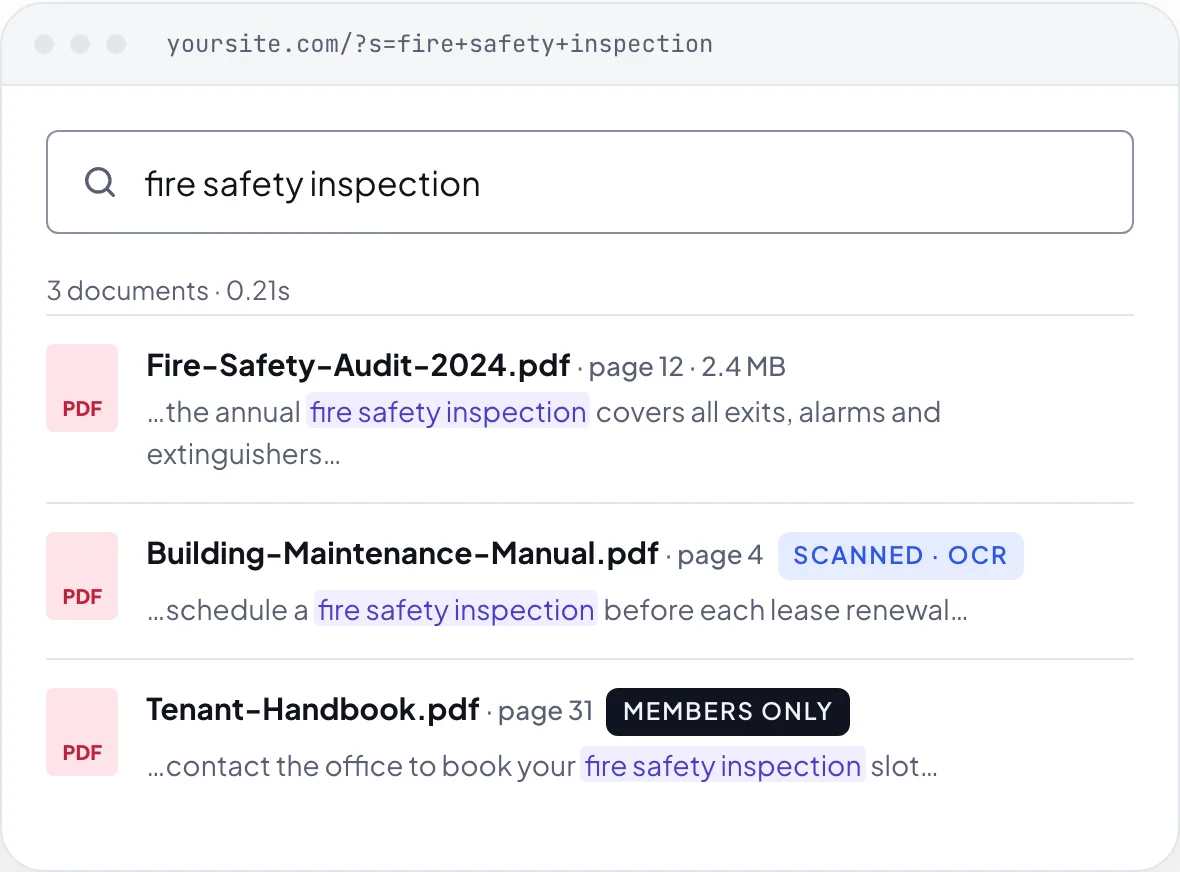
What your visitors see today: nothing, even though the answer is in your PDFs.With PDF Search Pro: the exact document and page, even from scanned files.
WebEquipe PDF Search Pro is a WordPress plugin that indexes the full text of your PDF files, including scanned documents via Google Vision OCR, and makes them searchable through WordPress's native search and a dedicated shortcode form. It is used by government sites, universities, membership portals, product documentation sites and WordPress agencies.
“★★★★★
…providing a searchable index page for 100s of linked PDF files, 60+ years of board minutes.
AahswaimVerified review on WordPress.org
Trusted by document-heavy sites
LLogistia
✦Board minutes archive
🏛 Councils
🎓 Universities
🔒 Membership portals
💼 Agencies
5.0★★★★★on WordPress.org · 200+ active installs
Default WordPress search can't read inside PDFs. Titles only, so the answer stays buried in the file.
PDF Search Pro indexes every page. Visitors find what is inside, even in scanned documents.
See it in action
Watch PDF Search Pro in 60 seconds
Cloud OCR. Private visibility. Native search integration. Everything your PDF library needs.
★★★★★“Perfect for websites with many PDF files” · WordPress.org
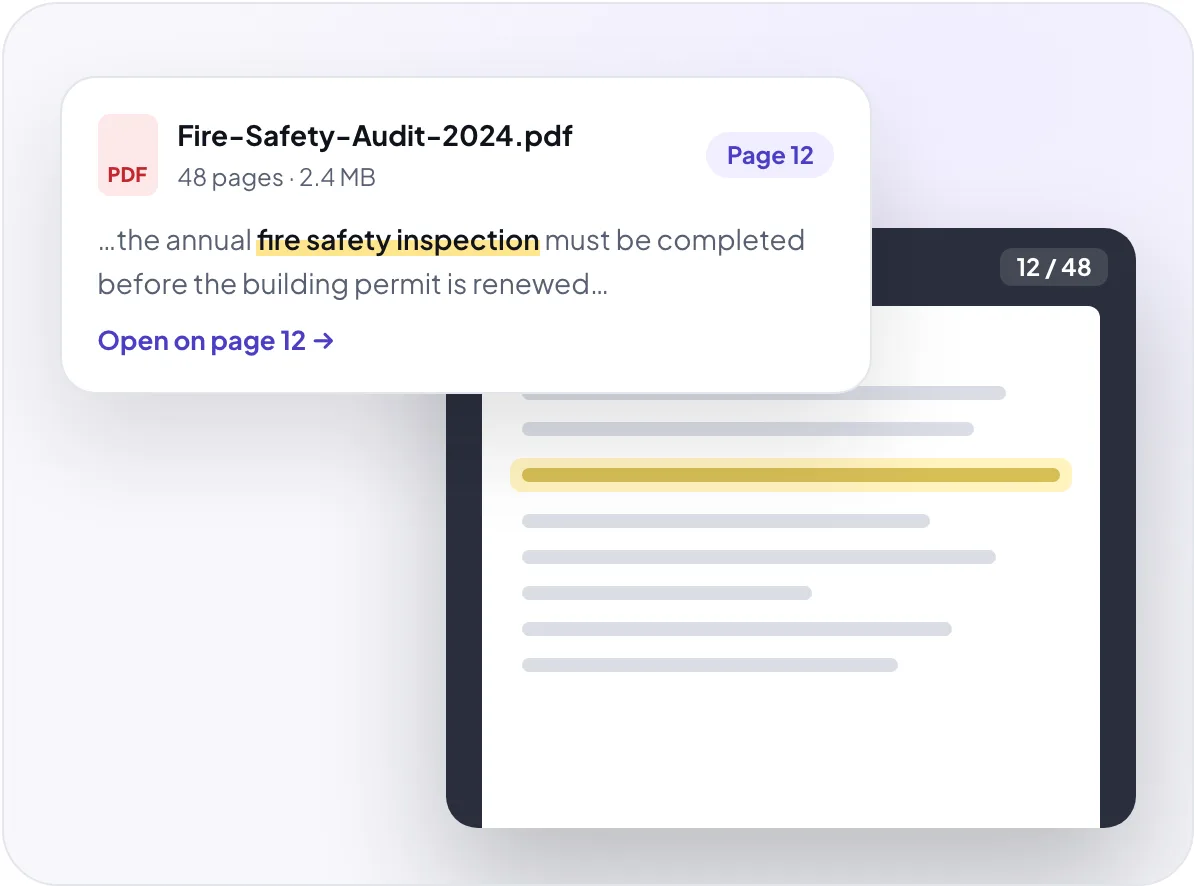
Other search plugins hand visitors a 200-page file. PDF Search Pro shows the matching words in the result and opens the PDF on the page where they were found.
Highlighted excerptsThe search words are marked in every result, with an excerpt length you choose.
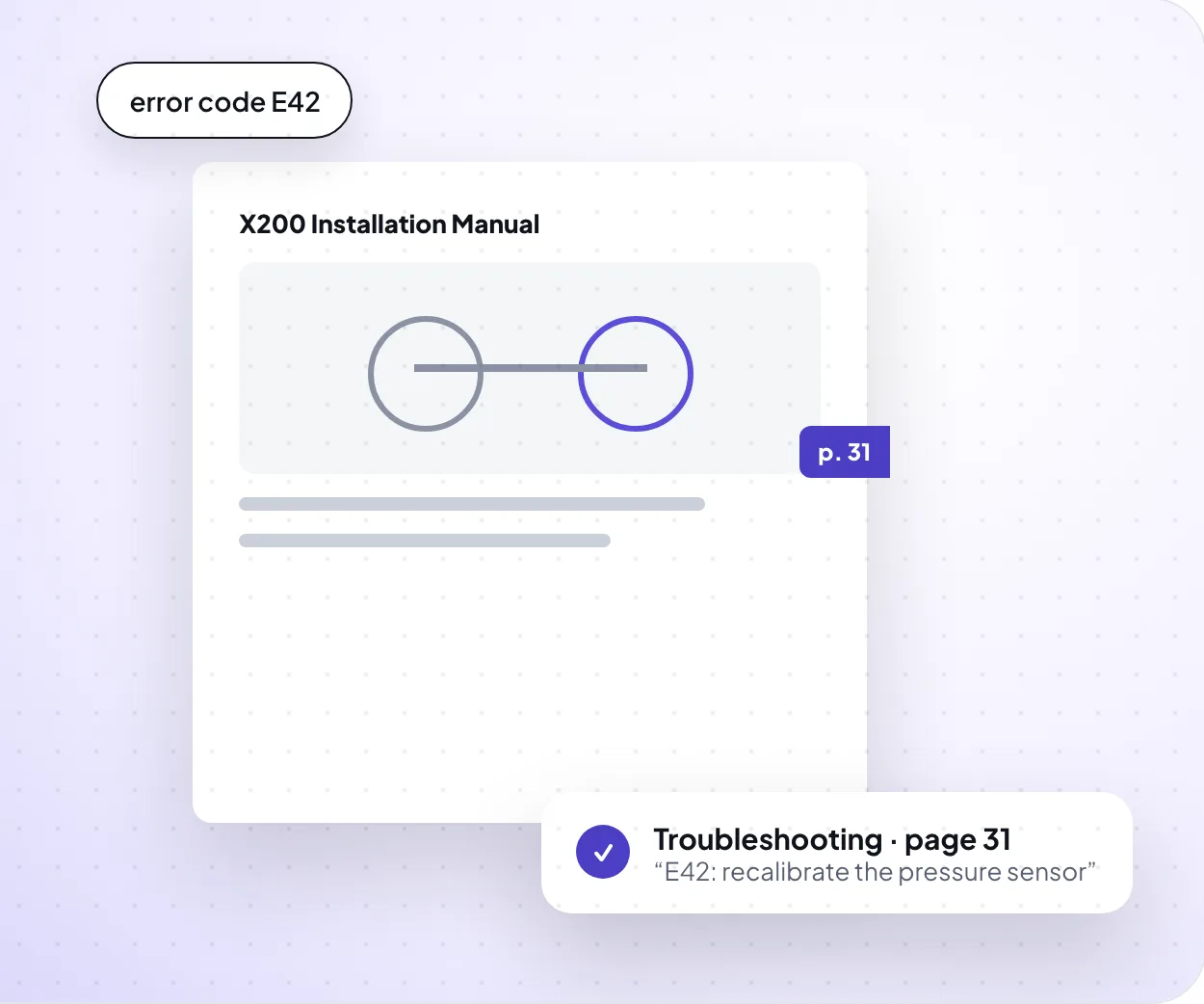
Opens on the matched pageEach page's text is stored separately, so a result knows which page it came from.
DearFlip flipbook viewerWith DearFlip Pro, results open in a lightbox on the matched page. If a file can't open there, it falls back to a normal PDF link.
Result layouts
Results that look like part of your site
Four layouts, each with its own display options and a live preview in settings. Save one as the site default, or give each search form its own.
PDF icon
File size
Page count
Thumbnail
Summary excerpt
Download count
Download button
Preview link
OCR · all paid plans
The only WordPress plugin that searches inside scanned PDFs
Old meeting minutes, archived forms, historical records: if a PDF was scanned from paper, other plugins can't read it. PDF Search Pro sends it to Google Vision OCR and makes every page searchable. Upload it. That's it.
Your documents: read, then deletedText PDFs are indexed on your own server and never leave it. Only PDFs that need OCR are sent, and only for as long as OCR takes.
1Your WordPress siteSends only PDFs that need OCR
2WebEquipe serverPasses it to Google Vision
3Google Vision OCRReads every page
4Text returnsStored in your WordPress database
Files deletedOnce the result is checked
Customer story
60+ years of board minutes, searchable on one page
!The problemHundreds of linked PDF files of board minutes, going back more than 60 years, and no way to search inside them.
⚙What we didIndexed every PDF, and on request added sorting by file name, which matched how their files were dated.
✓The resultA searchable index page for the whole archive, with small issues fixed within 24 hours.
“These app people have the most stellar response and support: contacted them twice for small hiccups and, within 24 hours, app adjusted!”
AahswaimVerified review on WordPress.org
Features
Everything in PDF Search Pro
Grouped by what you need to do. Every feature here is on all paid plans unless it says Pro+.
Find anything
Search reads inside PDF content and titles, not just file names. Add exact phrase matching, sorting and advanced filters, and share any filtered search as a link.
Active filters saved in the URL, so a search can be shared
Show results your way
Pick a list, card grid, compact list or table. Show or hide each detail, preview it in settings, and override the layout per search form.
List, card grid, compact list or table
A different layout for each shortcode form
PDFs only, or mixed with posts and pages
Results inside your theme's normal search too
Control what is found
Keep a PDF out of search for good, take it out for now, or make it visible only to logged-in members. Change one file or hundreds at once.
Exclude a PDF permanently, include it again later
Unindex for now, re-index any time
Private PDFs, found only by logged-in visitors Pro+
New uploads can start as private Pro+
Bulk index, unindex, include, exclude, public or private
The index entry is removed when a PDF is deleted
OCR you can rely on
Scanned PDFs are read by Google Vision. Progress shows live, busy moments retry on their own, and a stuck job can be recovered without uploading the file again.
Automatic OCR on upload, or run it by hand
Monthly OCR page credits, reset each billing cycle
Usage meter on the dashboard
Live progress while a file is processing
Automatic retry when the OCR service is busy
Watchdog and Sync from server for stuck jobs
Text PDFs never use OCR credits
Easy to manage
Everything sits under one menu, PDF Search Pro. See what is indexed, what failed and why, without leaving WordPress.
Index Activity timeline with a processing log
Search Indexed column and a details box in the Media Library
“These app people have the most stellar response and support: contacted them twice for small hiccups and, within 24 hours, app adjusted! App does as we hoped: providing a searchable index page for 100s of linked PDF files, 60+ years of board minutes. Keyword feature works well and, upon request, they added option to sort by file name which was perfect since we had set up field names with dates. Well done!”
AahswaimVerified on WordPress.org★★★★★
“We tried a more expensive vendor, and we're not happy with the overly extensive configuration yet with little feedback from which files were indexed. WebEquipe even added some requested functionality to the plug-in which made me and my client very happy.”
BBrad WarrenVerified on WordPress.org★★★★★
“Perfect for websites with many PDF files. It makes searching inside documents very easy for visitors.”
Iiftekharsiam109Verified on WordPress.org★★★★★
“Does exactly what it says. Set up in minutes, PDFs are now fully searchable on our site. Great plugin.”
WWordPress UserVerified on WordPress.org★★★★★
“Really useful plugin. Exactly what I needed to make my document library searchable. Works perfectly.”
Before and after indexing and search, results HTML
Free plugin import
Brings your existing index into Pro once
What's next
On the roadmap
Built from customer requests. Not released yet, so not included in today's plans.
In progressEmail gate before download
PlannedAI semantic search
PlannedAI summaries in results
PlannedAJAX live search
PlannedGutenberg search block
PlannedWooCommerce integration
PlannedOCR top-up credits
PlannedEach matching page as its own result
FAQ
Frequently asked questions about WordPress PDF search
What does WebEquipe PDF Search Pro do?
WebEquipe PDF Search Pro is a WordPress plugin that indexes the text of the PDF files in your Media Library and makes it searchable. Visitors find words inside PDFs from your normal site search, or from a dedicated PDF search form placed on any page. Text-based PDFs are indexed on your server; scanned PDFs are read with Google Vision OCR on a paid plan.
Does WordPress search PDFs by default?
No. Default WordPress search only reads post titles and page content. It ignores everything inside uploaded PDF files, so a visitor searching for a policy name, course code or model number gets zero results, even when the answer is in one of your documents.
Can it search inside scanned PDFs?
Yes, on Starter, Pro and Agency. Scanned and image-only PDFs are read by Google Vision OCR, automatically on upload if you choose. Each paid plan includes monthly OCR page credits that reset each billing cycle. Ordinary text PDFs never use OCR credits.
Where do my PDFs go when they are read by OCR?
PDFs with a text layer are indexed on your own server and never leave it. Only PDFs that need OCR are sent to the WebEquipe OCR service, which passes them to Google Vision. The text comes back to your WordPress database, and the files are deleted once the result is checked.
Can I see what visitors search for?
Yes, on Pro and Agency. Search analytics, under PDF Search Pro → Analytics, shows total searches, searches with no results, top search terms, content gaps, most-clicked PDFs and filter usage, and exports search and click data as CSV for any date range.
Will it slow down my WordPress site?
No. Large PDFs are indexed in the background with WordPress cron, so uploads do not time out and visitors are not affected. Searches run against a pre-built index, using FULLTEXT search when your database supports it.
How do I keep certain PDFs private or out of search?
Use Exclude to keep a PDF out of search permanently: it stays in your Media Library but is skipped, even during Re-index All. Use Private (Pro and Agency) to keep a PDF searchable for logged-in visitors only. Both work per file or in bulk.
I use the free plugin. Do I need to re-index?
No. Pro imports the free plugin's existing index once. If the free plugin is still active, Pro deactivates it so the two do not run together.
Does it work with my theme and language?
It works with block themes, with extra compatibility for Avada and HashThemes Total, and on WordPress Multisite, where each site keeps its own index. The admin is available in English, French, German, Dutch and Swedish. It requires WordPress 6.2+ and PHP 7.4+.
What is your refund and cancellation policy?
Every paid plan has a 7-day money-back guarantee; OCR credits you have already used are deducted from the refund. After 7 days licences are non-refundable. If you cancel, you keep access until the end of the current billing period, and unused OCR credits expire then.
How is this different from SearchWP or Relevanssi?
SearchWP and Relevanssi are full site-search suites covering posts, custom post types and WooCommerce. WebEquipe PDF Search Pro is built for PDF search only. It costs less, installs faster, and includes Google Vision OCR for scanned PDFs, which neither offers natively.
Does it support password-protected PDFs?
No. Password-protected and corrupt PDFs cannot be indexed. Remove the password from the file, upload it again, and it will index normally.
Make every PDF on your site searchable today
OCR for scanned PDFs, private search and analytics, from $7/mo billed yearly, with a 7-day money-back guarantee.