

 Free WordPress plugin · no account needed
Send any WordPress event to any endpoint.
Form submissions, WooCommerce orders and any WordPress action hook, sent as clean, structured payloads to n8n, Zapier, Make, Slack or your own API. Nothing routes through us.
- Free on WordPress.org
- 5 form plugins + WooCommerce + any hook
- Actively maintained · tested up to WP 7.0
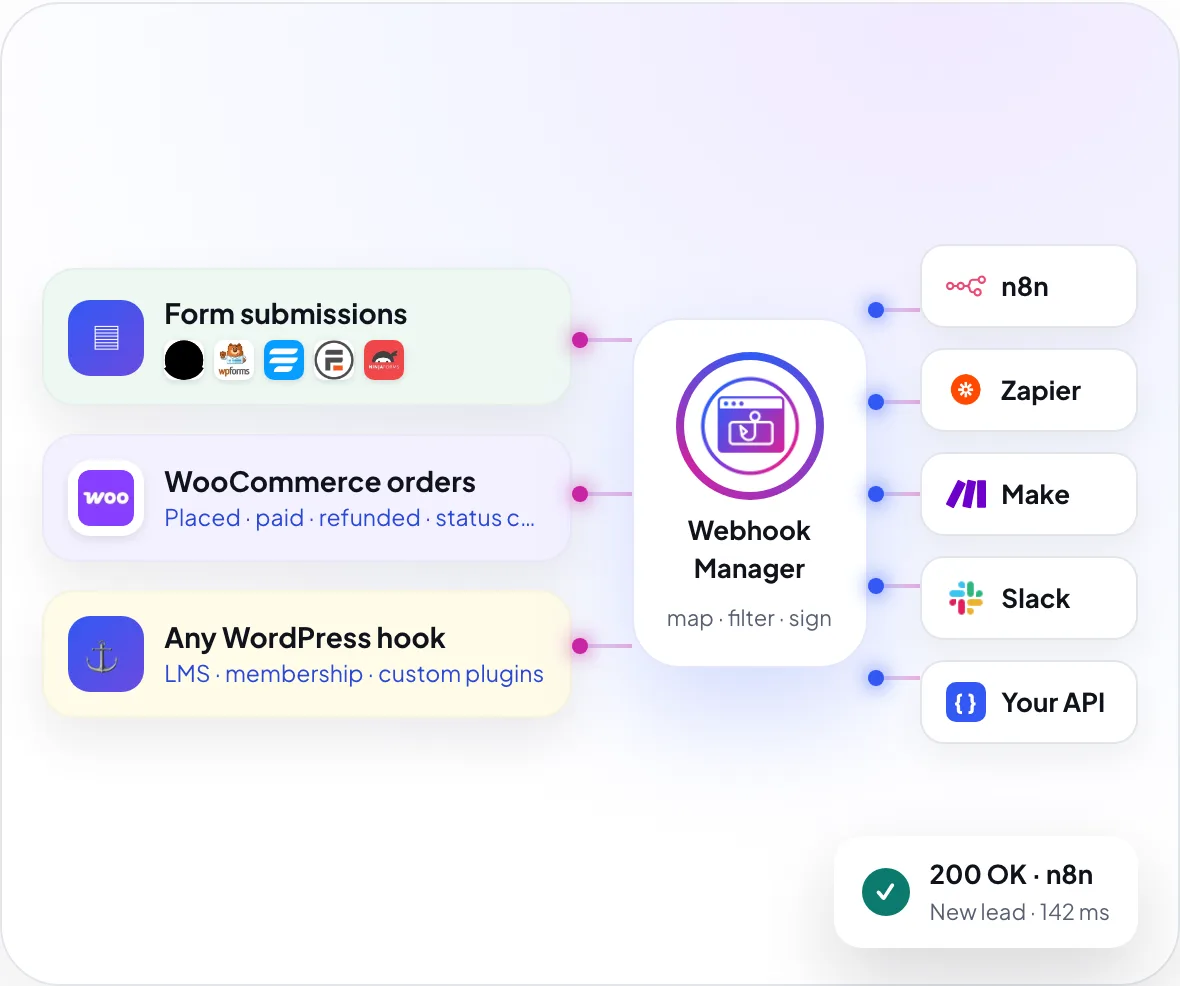
WebEquipe Webhook Manager is a free WordPress plugin that sends events from form plugins, WooCommerce and any WordPress action hook to webhook endpoints you configure, with payload mapping, conditional delivery, request signing and full delivery logs. It works with n8n, Zapier, Make, Slack and any custom API that accepts a webhook.
Captures events from
 Contact Form 7
 WPForms
 Fluent Forms
 Formidable Forms
 Ninja Forms
 WooCommerce
- ⚓Any action hook
Delivers to
 n8n
n8n Zapier
 Make
Make Slack
Slack- { }Your own API
- ↗Any webhook URL
Why Webhook Manager
Stop wiring integrations by hand
Manual integrations
- Hire a developer for every new integration
- Custom code breaks on plugin updates
- Locked to one automation vendor
- No idea when a delivery fails silently
With Webhook Manager
- Point-and-click setup, no code
- Delivery logs show exactly what was sent and received
- Works with n8n, Zapier, Make or your own endpoint
- Covers every plugin on your site, not just the popular ones
See it in action
From WordPress to your tools in one minute
Add a connection, pick a trigger, shape the payload and watch the delivery land, all without writing code.
How it works
Set it up once, let events flow
Four steps in the WordPress admin. No code, no external account.
{
  "event": "wpforms.submitted",
  "form": "Contact us",
  "full_name": "Jane Smith",
  "email": "jane@example.com",
  "budget": 5000,
  "source": "website",
  "submitted_at": "2026-10-27T09:41:12Z"
}- 01
Add a connection
Name it, paste the destination URL and choose authentication if the endpoint needs it.
- 02
Choose a trigger
A form submission, a WooCommerce event, a WordPress core event, or any hook from any plugin.
- 03
Shape the payload
Send everything, pick fields, rename them, add static tags or set conditions.
- 04
Deliver and confirm
The event fires, the payload is sent, and Logs shows success, failure or skip with full detail.
The difference
If it's a WordPress hook, it can send it
Most webhook plugins support a handful of named integrations. Webhook Manager has clean adapters for forms and WooCommerce, then covers everything else (LMS, membership, custom code, plugins that don't exist yet) through a generic adapter that listens to any action hook.
- Don't know the hook name?Scan your installed plugins and pick from a filtered list.
- IDs become full objectsAn order ID arrives as the full order, so you're not mapping raw numbers.

Customisation
Built for real APIs, not just a URL
Connections and payloads are configured the way your endpoint's documentation describes them.
Authentication
Pick the mode your endpoint needs. Signed requests add a timestamp and an HMAC signature, in five patterns to match what your partner documented.
- None, Bearer / JWT token, or username and password
- Sign each request with HMAC
- Five signature patterns, including Custom
- Secrets encrypted at rest

Extra headers
Send the exact headers your partner documented, with placeholders filled in at send time. This is also how header-style API keys work, for example n8n Header Auth.
- Any header name and value
- Placeholders like {{unix}} and {{hmac}}
- Header-style API keys
- Sensitive headers redacted in logs

Map and rename
Send every field, a subset, or renamed keys. Add static fields that are always included, and transform values before they are sent.
- All fields, a subset, or remapped keys
- Static name / value fields
- Per-field transforms
- No plugin noise or security tokens

Conditions
Skip delivery unless all (AND) or any (OR) of your field rules match: equals, contains and number comparisons. Skipped deliveries still show in Logs, with the reason.
- Match all (AND) or any (OR)
- Equals, contains, greater or less than
- Skips are logged with the reason
- Different rules per webhook

Logs and dashboard
Know every delivery landed
Every request and response is logged in your own database. Inspect it, copy it, replay it, or export it as CSV.

Use cases
Connect WordPress to the tools you already use
-
Order paid→Accounting→Fulfilment
Online stores
Push new orders and payment events into your fulfilment or accounting automations, and start renewal flows on subscription events.
-
Form sent→CRM→Slack
Forms and leads
Send Contact Form 7, WPForms, Fluent, Ninja or Formidable submissions to your CRM or Slack instantly, as clean, labelled payloads.
-
Course done→Certificate→CRM tag
Courses and memberships
Course completions and membership changes are captured through the generic hook adapter, with no custom code.
Security and privacy
Your data goes only where you send it
- Nothing routes through usPayloads go only to the URLs you configure. Nothing is sent to WebEquipe.
- Signed requestsHMAC signing with timestamp and signature headers, in five patterns.
- Encrypted secretsAuth tokens and signing secrets are encrypted at rest.
- Logs in your databaseSet the retention period, redact sensitive headers, remove everything on uninstall.
// Header: X-WEWM-Signature: t=<unix>, v1=<hex>
$expected = hash_hmac('sha256', "$t.$rawBody", $secret);
if (!hash_equals($expected, $v1)) {
    http_response_code(401);
    exit;
}Built by WebEquipe
From the team behind PDF Search Pro
The same developers build and support Webhook Manager. PDF Search Pro is rated 5.0 ★ on WordPress.org, and reviewers mention fixes within 24 hours.
- 1.2.0Authentication and signing on one screenExtra headers with token insertion, configurable HMAC signing, add-row conditions and transforms.
- 1.0.4Hook discovery and a better dashboardScan installed plugins for hooks, 7-day chart, searchable lists, full request and response in logs.
- 1.0.2Security hardeningAllowlist that blocks executable and script files, plus Logs fixes.
- 1.0.0First releaseForms, WooCommerce and any-hook triggers with delivery logs.
Reviews
What WordPress users say
“These app people have the most stellar response and support: contacted them twice for small hiccups and, within 24 hours, app adjusted!”
What's next
On the roadmap
Planned, not released yet.
- PlannedElementor and Bricks form adapters
- PlannedLearnDash and MemberPress adapters
- PlannedTemplates for n8n, Zapier and Slack
- PlannedScheduled triggers on WP-Cron
FAQ
Questions about WordPress webhooks
What does WebEquipe Webhook Manager do?
Webhook Manager is a free WordPress plugin that captures events from form plugins, WooCommerce and any WordPress action hook, and sends them as JSON or form-encoded payloads to webhook endpoints you configure, such as n8n, Zapier, Make, Slack or your own API. It includes payload mapping, conditional delivery, request signing and delivery logs.
Which form plugins are supported?
Contact Form 7, WPForms, Fluent Forms, Formidable Forms and Ninja Forms. WooCommerce events and arbitrary WordPress action hooks are also supported.
Does it work with plugins that are not on that list?
Yes. Any plugin that fires a standard WordPress action hook can be captured through the generic hook adapter, with no dedicated integration required. You can scan your installed plugins to find the hook name.
Does the plugin send my data anywhere by default?
No. Payloads are sent only to the connection URLs you configure. Nothing is sent to the plugin author or any WebEquipe service.
How do I verify the HMAC signature on the receiving end?
When a signing secret is set, requests include the header X-WEWM-Signature: t=<unix>, v1=<hex>. Recompute hash_hmac('sha256', "$t.$rawBody", $secret) and compare it to v1 using a constant-time comparison.
How do I set up n8n or similar authentication?
Use Username and password for n8n Basic Auth, None with Extra headers for Header Auth, and Bearer / JWT for token-based authentication.
Where are delivery logs stored?
In custom database tables in your own WordPress database. You can set a retention period and export or replay logs from the Logs screen.
Will it slow down my site?
No. Adapters only hook into the events you configure, and delivery can run asynchronously via WP-Cron so the request is not blocked.
Why is my GET request sent without a body?
GET and HEAD requests do not carry a request body. Use POST, PUT or PATCH when the endpoint expects a payload.
Does it provide shortcodes or blocks?
No. Webhook Manager is configured entirely in the WordPress admin, under Webhook Manager → Connections, Webhooks and Logs.
Connect WordPress to your automation stack today
Free on WordPress.org. Install it, add a connection and send your first webhook in minutes.
Help
Set up in minutes, help when you need it
- Price
- Free
- Tested up to
- WordPress 7.0
- Requires
- WordPress 6.0+ · PHP 7.4+
- Configured in
- WP admin · no shortcodes
Support
We're here to help
Questions about Webhook Manager, a bug, billing, or a feature you'd like. The developers who built it will reply.
- 24–48 hour repliesMonday to Friday
- 7-day money-back guaranteeOn every paid plan
Message sent
Thanks. We'll reply to your email within 24–48 hours.